How do BroadWorks call events get onto a live board?
Seen in practice: Know who's calling before you pick up
Short answer
We connected Cisco BroadWorks to a live call board so agents could see who was calling while the phone was still ringing. BroadWorks sends call events through Xsi-Events. We put them on an Amazon SQS FIFO queue, run the caller lookup separately, and push updates to the browser over a WebSocket. In our logs, the call record was typically created in about 0.6 seconds, with caller and booking details ready at about 2 seconds when we found a match.
Context and constraints
The call centre takes more than a thousand inbound calls on a typical weekday. The phones were on a carrier-hosted BroadWorks system. Customer records and appointments were in the CRM and booking system. We wanted the agent to have those details in front of them by the time they picked up.
BroadWorks has a subscription feed called Xsi-Events. In this setup, it posts XML to our callback when something happens on a call, such as an answer, a hold or a hang-up. Callback errors could cost us the subscription in this deployment, so we wanted very little work between receiving the event and acknowledging it. The existing systems would still own customer records and bookings.
How it works
1. Receive the event. A small function reads the fields it needs to queue the message, including the event, subscription and call IDs. It puts the original XML on the queue and sends HTTP 200 once the queue accepts it. That’s the whole job of the callback. The database work and the caller lookup happen later.
2. Keep each call’s events together. We use the subscription ID and call ID as the SQS message group. SQS preserves the order in which messages enter each group. We use the BroadWorks event ID as the deduplication ID, so repeat sends with that ID are suppressed within the five-minute deduplication window. If processing fails, the message can be retried. After repeated failures, it goes to a dead-letter queue where we can inspect it and decide whether to replay it.
A transfer taught us which ID to use. BroadWorks also sends a tracking ID, and that looked like a good key until we saw one change partway through a transferred call. Grouping on it could split what the agent saw as one call across two queue groups. We measured this on production before settling on the call ID.
3. Route the event. The router parses the XML and passes it to the workflow for that event type. There’s a workflow for a new inbound call, another for an answer, another for a hold, and so on.
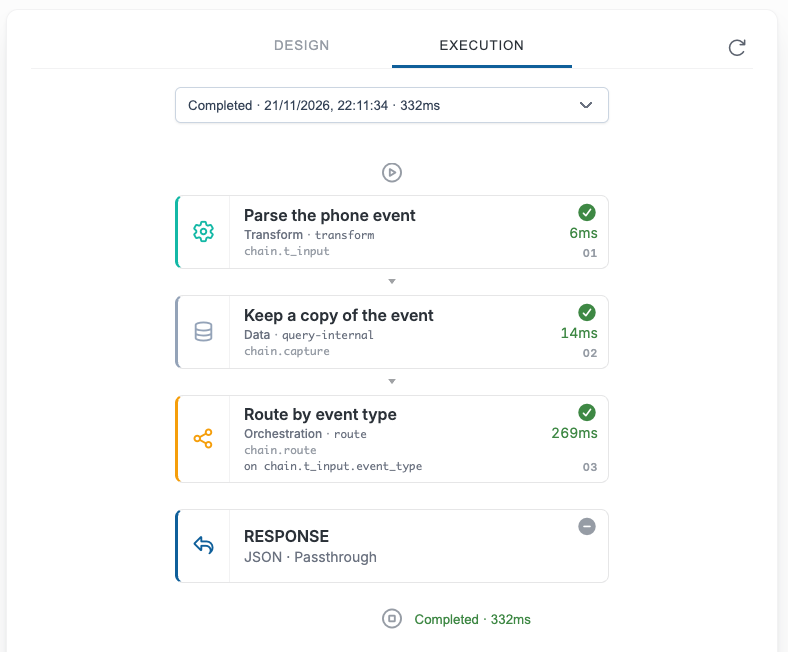
4. Update the call. The first event creates the call record and tells the board there’s a new card. Later events change its state. That’s what moves it across the board as the call is answered, put on hold or finished.
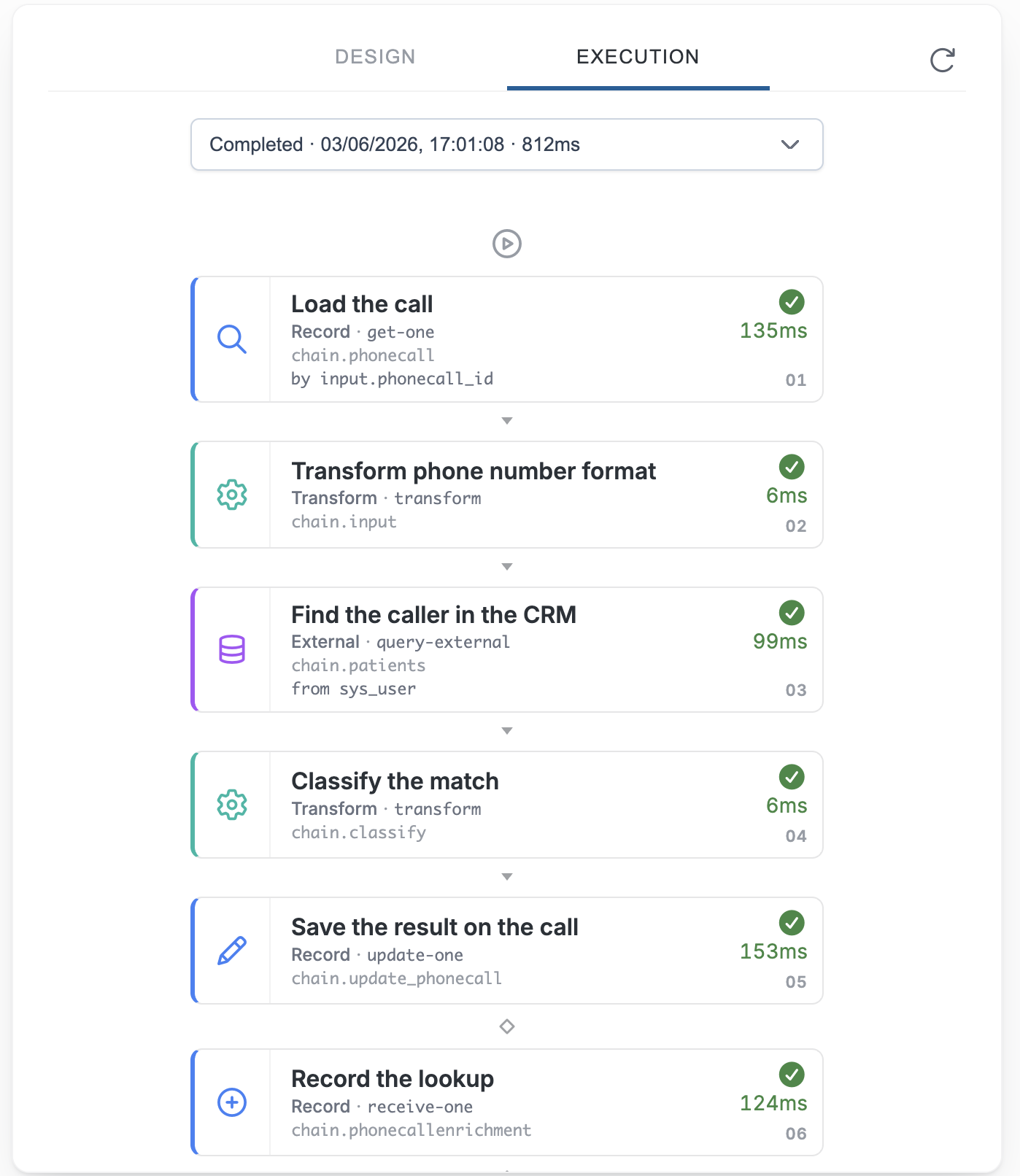
5. Look up the caller. The first event also starts a separate lookup by phone number. If there’s one match, we fetch the caller’s details and their next appointment. If several people share the number, the agent can pick from the matches. If there’s no match, the card still shows the number.
Screenshot: One run of the caller lookup on our test system, with the time each step took
6. Push the changes to the board. The browser gets an update over a WebSocket whenever there’s something new to show. The card can appear with a phone number, then fill in as the lookup finishes.
How long it took
On the working day we measured, about 8,700 phone events went through this path. For a typical inbound call, the call record was created at about 0.6 seconds, the caller was identified at about 1.2 seconds, and the enriched details were ready at about 2 seconds. Agents typically answer at 4.7 seconds.
Why we built it this way
Get the card up first. Even a card with just a phone number tells the agent a call is coming. A slow CRM lookup can delay the details while the card is already there.
Keep the callback small. The phone system needs an acknowledgement. The agent needs a name and an appointment. Putting the queue between those two jobs lets us acknowledge the event before we do the slower work.
Make the workflows small enough to change. The router, call handlers and lookup are configured in the same workflow engine. When the sales team asked for their own board, we could use the same event path and change what the workflows did for their calls.
Why not something else?
Why not open the CRM record when the phone rings? That would have saved the first search. The agent would still have had to find the booking and work out what to do next. On the board, the agent can see the other calls and open the one they’re handling, with the appointment ready to use.
Why not poll for active calls? The agent might pick up in a few seconds. Polling gives us a choice about how often to check. The event feed gives us the update when BroadWorks sends it.
Why not write to the database from the callback? A slow database would make BroadWorks wait for its acknowledgement. Once the queue has accepted the event, the workflow can do that work separately and retry if it needs to.
The queue gives us a recovery path for events it has accepted. If an event never reaches it, we’d need a separate way to detect the gap.
Read next