How do we cancel an appointment from the call board?
Seen in practice: Know who's calling before you pick up
Short answer
An agent can cancel an appointment from the call card while they’re still talking to the caller. When they submit the cancellation, a workflow reads the current appointment, sends the request to the booking system’s API and records the result against the call. The booking system applies its own rules, and the call card shows what happened.
Context and constraints
Once we had the appointment on the call card, the next question was obvious. If we can see it here, can we deal with it here?
To cancel an appointment, the agent used to find the customer in the CRM, open the diary and find the booking while the caller waited. We wanted them to handle that from the screen they already had open. The booking system already knew which cancellations were allowed and who needed to be notified. It could keep doing that job.
How it works
The agent opens Cancel on the appointment and submits the form. That starts the workflow.
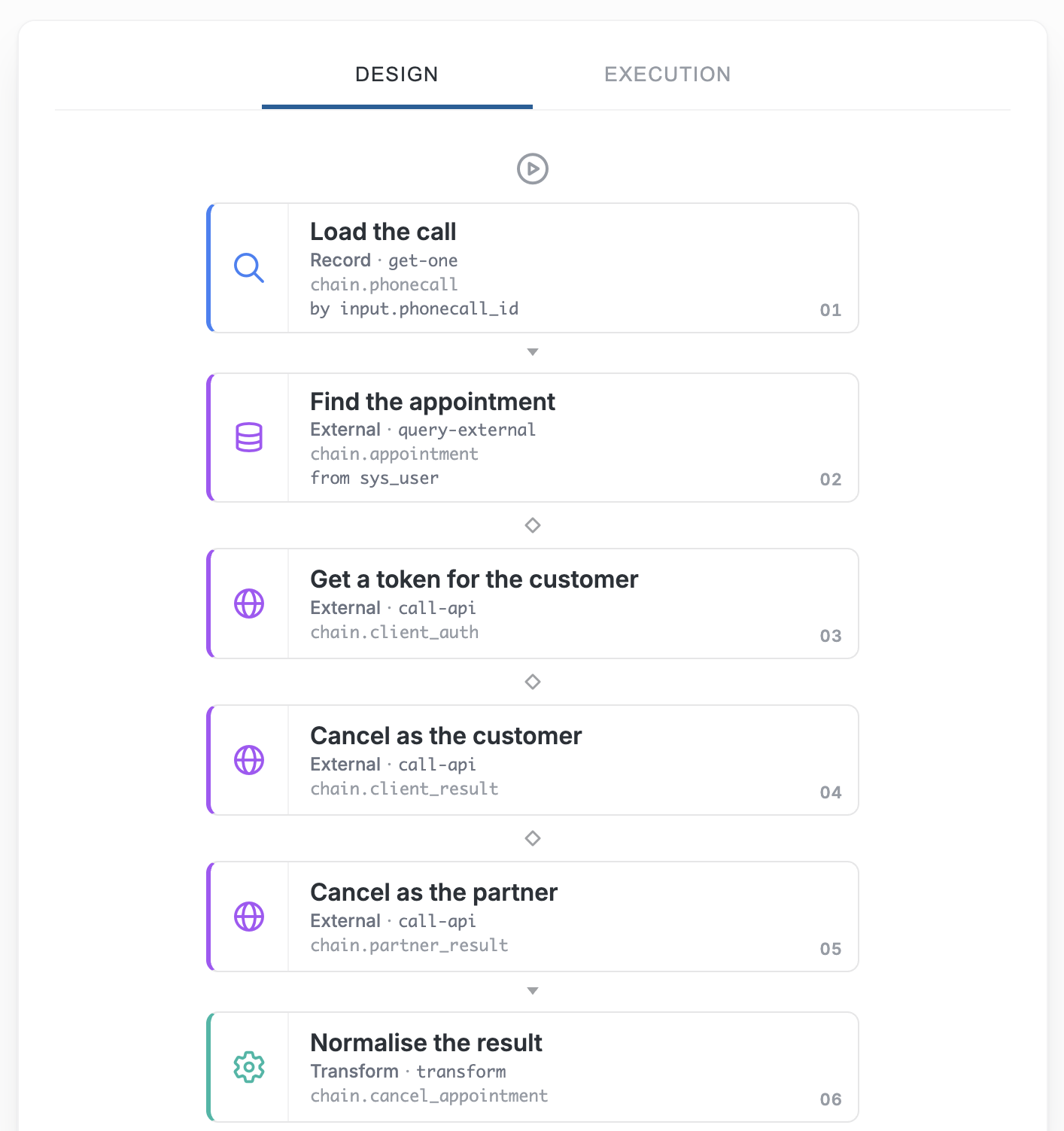
1. Load the call. We load the call record so we can tie the request to the right call and record which agent started it.
2. Read the appointment again. Someone may have changed the booking since the card loaded. We fetch it from the booking system before sending the cancellation request.
3–5. Take the right path through the API. The booking system has a customer route and a partner route. The workflow takes the route that applies to the booking. The customer route gets a token first. Both routes leave the cancellation to the booking system.
6. Normalise the result. The two routes can return different responses. We turn those responses into a common result so the card can show what happened, including the reason when the booking system gives one.
Then record it. We record the action, who started it, what we sent and what came back against the call. The call card waits for the result, then refreshes.
In our measurements, a cancellation typically took about 1.6 seconds.
Why we built it this way
The booking system gets the final say. We can use the booking system’s rules to decide which buttons to show. The API still checks the request when the agent submits it. If the booking system says no, the card can tell the agent why.
The result belongs with the call. If someone picks up the record later, they can see who requested the cancellation and what the booking system said. That’s useful on a busy team where the next person to look at the call might be someone else.
It’s the same workflow engine we used to build the board. Reading a record, calling an API, transforming a response and saving the result are steps we already had. Here we put them together around a button the agent needed during the call.
Why not something else?
Why not write straight to the booking database? The booking system’s API is where its cancellation checks and notifications run. We wanted a cancellation from the board to go through those same checks.
Why not keep a synchronised copy of bookings? Reading the appointment on demand was fast enough here. It also meant the workflow could start with the booking as it stood when the agent asked to cancel it.
Why not just link to the CRM? The card already has that link for the rest of the work. We put Cancel and Reschedule on the card because they were the requests the team handled most often when we started. Rescheduling has its own workflow. This one follows cancellation through to the result.
Read next